Past Employers
The Past Employers section in CloudHR stores an employee’s previous work experience history.
This section captures:
- Company information
- Employment duration
- Designation
- Key skills used
- Responsibilities
- Reason for leaving
- Reference contact details
It helps HR evaluate:
- Experience relevance
- Career progression
- Skill history
- Reference verification
Section Structure
The form is divided into:
- Employer Information
- Employment Duration
- Skills
- Reference Contact
- Responsibilities (AI-supported)
- Reason for Leaving (AI-supported)
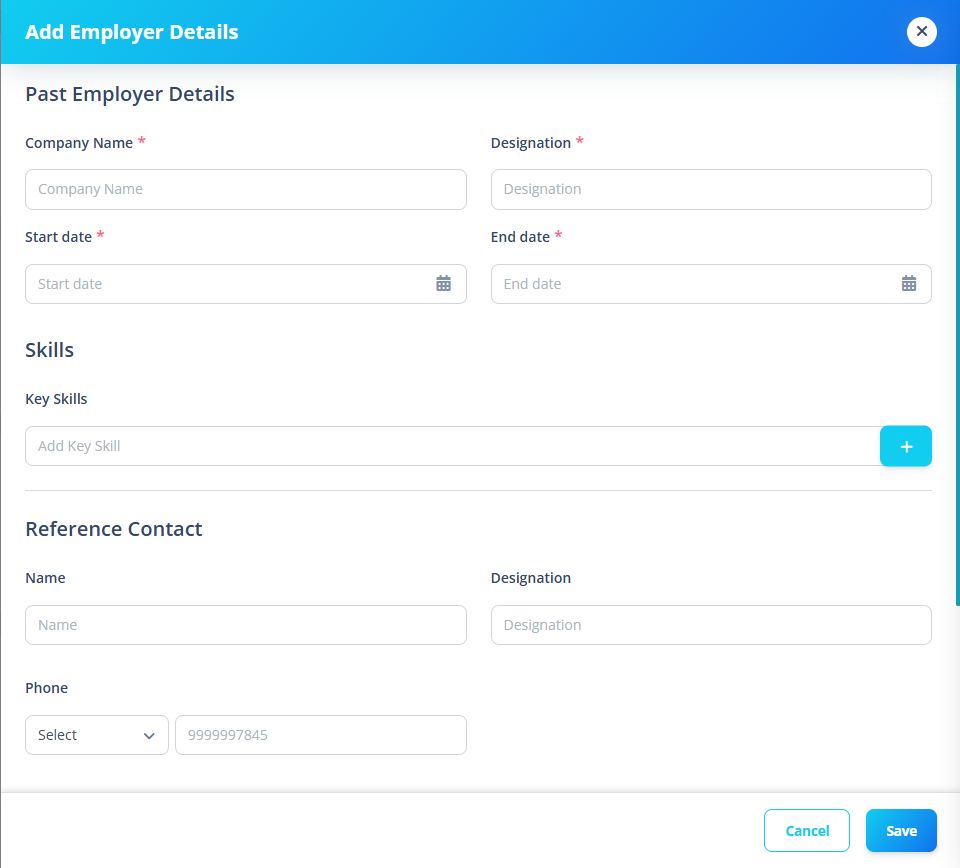
1️⃣ Employer Information
Fields
| Field | Required |
|---|---|
| Company Name | ✅ |
| Designation | ✅ |
2️⃣ Employment Duration
Fields
| Field | Required |
|---|---|
| Start Date | ✅ |
| End Date | ✅ |
3️⃣ Key Skills
Employees can add:
- Multiple skills
- Dynamic skill badges
- Duplicate prevention (case-insensitive)
Behavior
- Press Enter or click +
- Skills appear as removable badges
- Duplicate entries blocked
- Stored as array
4️⃣ Reference Contact
Optional but structured.
Fields
| Field | Required |
|---|---|
| Name | ❌ |
| Designation | ❌ |
| Phone Code | Conditional |
| Phone | Conditional |
Conditional Validation
If phone is entered:
- Phone must be valid (8–12 digits)
- Cannot start with 0
- Phone code becomes required
5️⃣ Responsibilities
- Gemini integration
- AI refinement
- Short paragraph generation
- Subject-aware prompts
6️⃣ Reason for Leaving
Similar to Responsibilities:
- AI-generated refinement
- Context-aware prompt
- Company name included in subject
- Focus validation required
Why This Section Matters
Past employment data is critical for:
- Background verification
- Resume consistency
- Experience validation
- Payroll grade decisions
- Skill matching