Education Details
The Education Details section in CloudHR stores an employee’s academic background.
This section helps HR manage:
- Academic qualifications
- Degree verification
- Eligibility checks
- Compliance records
- Document storage
Section Overview
Each education entry captures:
- Degree Information
- Institution Details
- Academic Duration
- Academic Performance
- Supporting Document
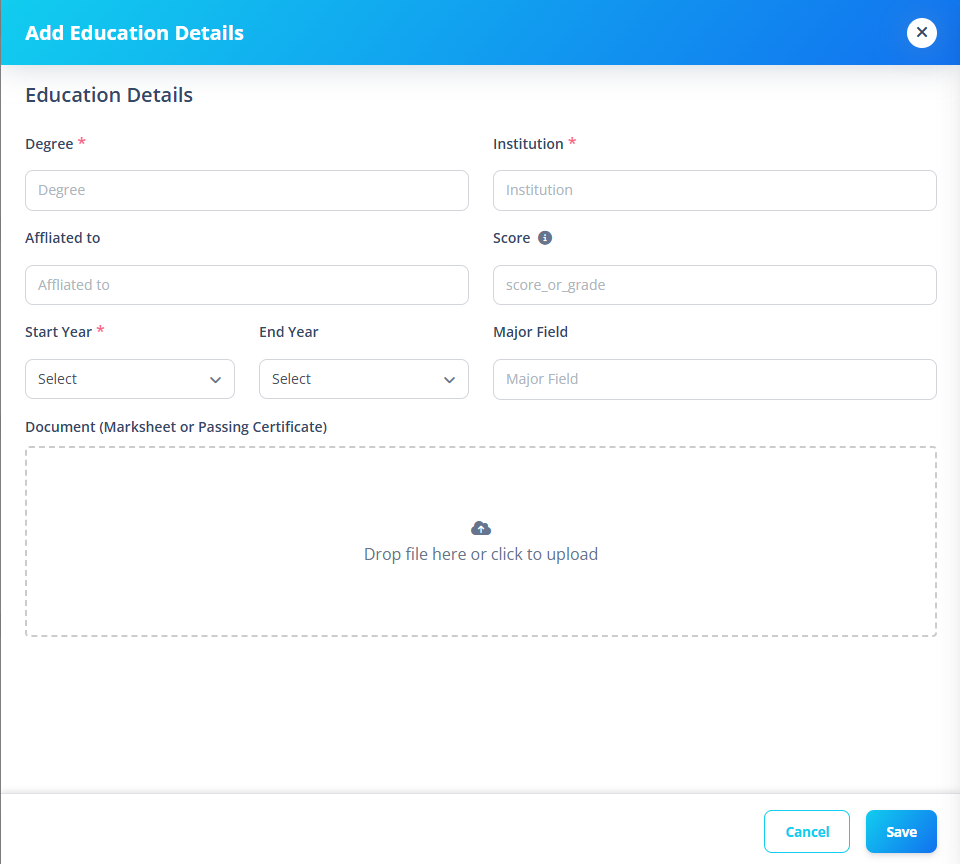
Multiple education records can be added.
1️⃣ Degree Information
Fields
| Field | Required |
|---|---|
| Degree | ✅ |
| Major Field | ❌ |
2️⃣ Institution Details
Fields
| Field | Required |
|---|---|
| Institution | ✅ |
| Affiliated To | ❌ |
Examples:
- University Name
- Board Name
- Affiliated University
3️⃣ Academic Duration
Fields
| Field | Required |
|---|---|
| Start Year | ✅ |
| End Year | ❌ |
Years are selectable from:
- 1950
- Up to 10 years beyond current year
Validation Rule
Custom validation ensures:
- End year cannot be before start year
- Revalidation triggered when start year changes
4️⃣ Academic Performance
Field
| Field | Required |
|---|---|
| Score | ❌ |
Supports:
- CGPA (e.g., 9.2)
- Percentage (e.g., 85)
5️⃣ Document Upload
Optional upload:
- Marksheet
- Passing certificate
- Degree certificate
Supported Formats
- JPG
- PNG
- JPEG
Why This Section Matters
Education data is essential for:
- Role qualification validation
- Promotion eligibility
- Background checks
- Compliance audits
- Visa documentation
- Academic verification
Storing documents ensures:
- Centralized record keeping
- Reduced paperwork
- Secure HR reference