Address Details
The Address Details section in CloudHR stores an employee’s:
- Permanent Address
- Present (Mailing) Address
This information is used for:
- Official communication
- Compliance documentation
- Payroll records
- Tax documentation
- HR correspondence
Section Structure
The Address form is divided into two parts:
- Permanent Address
- Present Address
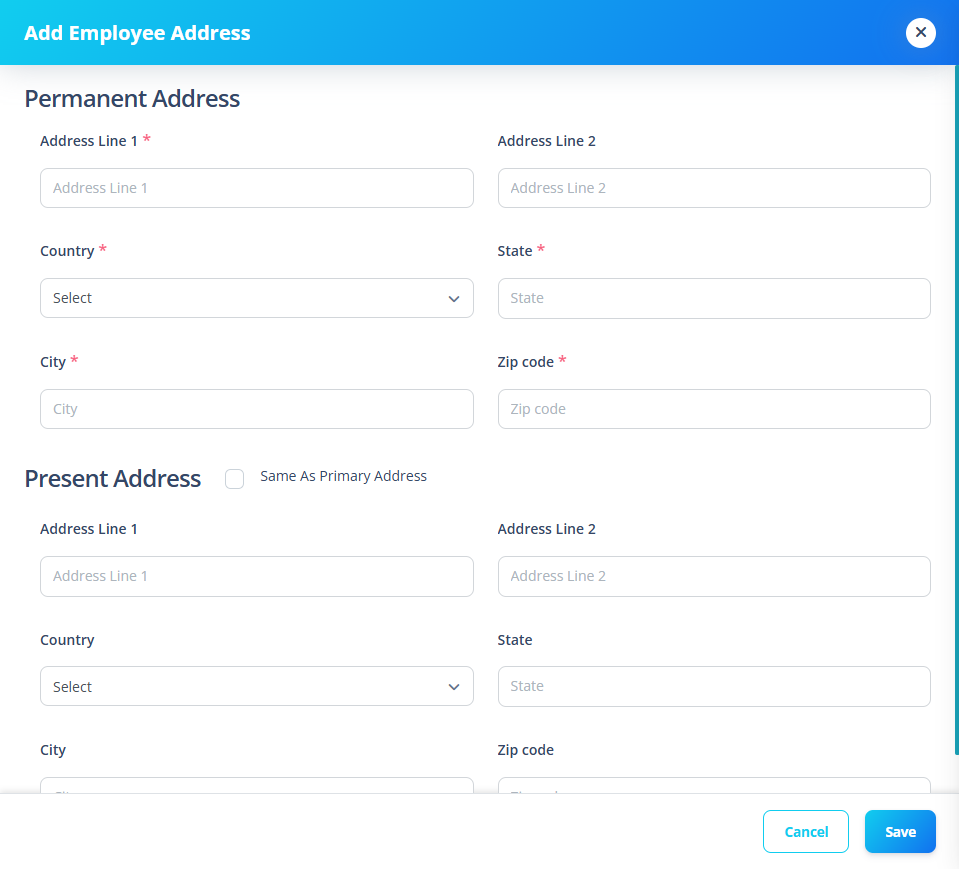
The user may choose to copy the Permanent Address into the Present Address.
1️⃣ Permanent Address
This is the employee’s primary legal address.
Fields
| Field | Required |
|---|---|
| Address Line 1 | ✅ |
| Address Line 2 | ❌ |
| Country | ✅ |
| State | ✅ |
| City | ✅ |
| Zip Code | ✅ |
Validation Rules
- Address Line 1 uses name validation helper
- Country must be selected
- State required
- City required
- Zip Code required
Country is selected from the system country list.
2️⃣ Present (Mailing) Address
Used for communication purposes.
Same as Primary Checkbox
If checked:
- Mailing fields auto-populate
- Mailing fields become disabled
- Any primary address update reflects instantly in mailing address
If unchecked:
- Mailing fields become editable
- Data must be entered separately
Mailing Fields
| Field | Required |
|---|---|
| Address Line 1 | ❌ |
| Address Line 2 | ❌ |
| Country | ❌ |
| State | ❌ |
| City | ❌ |
| Zip Code | ❌ |
Mailing address is optional unless different from primary.
When "Same as Primary" is enabled:
- Mailing fields mirror primary address automatically
- Deep reactive watch ensures live syncing
When disabled:
- Mailing fields reset
- User enters separate data
Why This Section Matters
Accurate address records are required for:
- Legal compliance
- Payroll taxation
- HR documentation
- Government reporting
- Employee identity verification
Incorrect address records can impact:
- Tax filings
- Offer letters
- Physical documentation delivery